High Bounce Rate on a Landing Page? What It Means and 9 Causes to Check
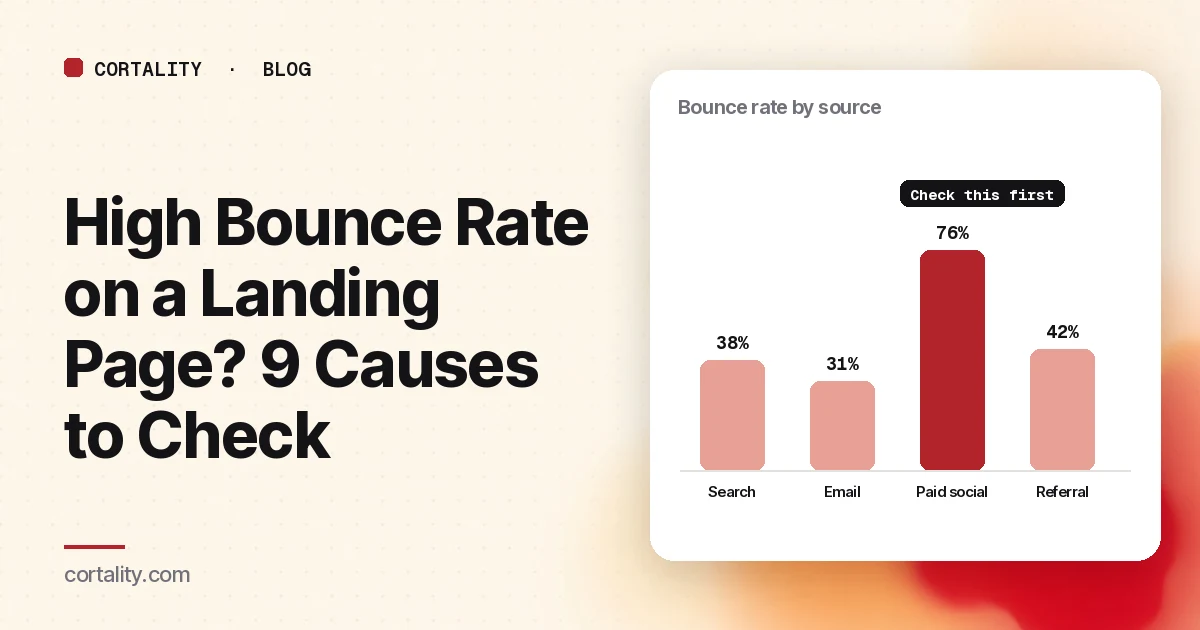
A high bounce rate is one of the first numbers people notice in their analytics, and one of the most misread. On a landing page with one job, plenty of people will leave without doing anything else. That alone isn't a problem. A high bounce rate paired with low conversions, or one traffic source bouncing far more than the rest, is.
This guide explains what the number actually counts in Google Analytics 4, how to tell whether yours is a problem, and nine causes to check in order.
First: what GA4 counts as a bounce
Bounce rate changed meaning when Google moved from Universal Analytics to GA4.
In the old Universal Analytics, a bounce was a single-page session: someone opened one page and left without sending another request to Analytics (Google, Universal Analytics bounce rate). A visitor could read your whole landing page for two minutes and still count as a bounce.
In GA4, bounce rate is the opposite of engagement rate: the percentage of sessions that were not engaged. A session counts as engaged if it meets any one of these (Google, GA4 engagement rate and bounce rate):
- It lasts longer than 10 seconds
- It has a key event, such as a form submission you've marked as one
- It has 2 or more page or screen views
So a GA4 bounce on a landing page means someone left within about 10 seconds, without triggering a key event and without visiting a second page. That is a much more useful signal: these people decided almost immediately that the page wasn't for them.
GA4 doesn't show bounce rate in most reports by default. Add it to the Pages and screens report, or to a landing page report, through Customize report, which needs an Editor or Administrator role (the same Google help page explains how).
Is your bounce rate actually a problem?
Skip the industry averages. They mix different traffic, offers and definitions, and they tell you nothing about why your visitors leave. Instead, compare your page against itself:
- By traffic source. Split bounce rate by session source and medium. If paid social bounces at twice the rate of search, the page isn't the only suspect.
- By device. Split by phone and desktop. A page that only bounces on phones usually has a phone problem.
- By campaign or ad. Tag every link with UTM parameters so you can see which ad or email sends the visitors who leave (Google, URL builders).
- Against conversions. If bounce rate is high but the page converts well enough to pay for its traffic, there may be better pages to work on.
A useful rule: a bounce rate that is high everywhere points to the page. A bounce rate that is high for one source, device or ad points to that segment.
9 causes to check, in order
1. The page doesn't match what people clicked
This is the most common cause. The ad, email or search result promised one thing, and the page leads with another. People decide in seconds that they're in the wrong place.
Check: put the ad or link text next to the page headline. Does the headline repeat the promise? Is the product, offer or price from the ad visible on the first screen?
2. The wrong people are arriving
Sometimes the page is fine and the traffic isn't. Broad audiences, accidental taps on full-screen placements, or keywords that only loosely match your offer all send visitors who were never going to stay.
Check: look at the source with the worst bounce rate. For ads, review the audience, placements and, for Google Search, the search terms report. Fixing the page won't fix this. If the traffic comes from Meta ads, our guide to Facebook ads that get clicks but no sales covers placements and campaign goals.
3. The page loads slowly on phones
People who arrive on a blank screen leave before they've seen anything. Google's Core Web Vitals target is a Largest Contentful Paint of 2.5 seconds or less, measured at the 75th percentile of page loads (web.dev, Web Vitals).
Check: run the page through PageSpeed Insights and read the mobile results first. The largest image or video on the first screen is the usual culprit.
4. The first screen doesn't say what this is
If the headline is a slogan and the subheading is vague, people can't tell in a few seconds whether the page is for them.
Check: show only the first phone screen to someone outside your company for five seconds. Ask what you sell and who it's for. If they can't say, rewrite the headline in plain words.
5. The main action is below the fold
Attention falls off quickly down a page. In a 2018 Nielsen Norman Group eyetracking study, people spent about 57% of their page-viewing time above the fold (NN/g, Scrolling and Attention).
Check: on a real phone, is the main button visible without scrolling? Does its label say what happens next?
6. Something blocks the page
A cookie banner, a newsletter pop-up and a chat widget can cover most of a phone screen before the visitor has read a word.
Check: open the page in a private window on a phone. Count how many taps it takes to see the content.
7. The page looks untrustworthy
Missing images, a broken layout, no company details or no proof near the action make people doubt the offer.
Check: is there at least one piece of proof, such as a review, logo or short case, near the main button? Are contact details and policies easy to find?
8. There's no obvious next step for people who aren't ready
Not everyone who lands is ready to buy or sign up. If the only option is "Buy now," the rest leave.
Check: give the not-yet-ready visitor one lower-commitment option, such as seeing an example, reading pricing, or a short FAQ, without competing with the main button.
9. The tracking is wrong
If bounce rate jumped overnight, or looks impossible, check the measurement before the page. A tag that fires twice, a missing key event, or a redirect that drops UTM parameters can all distort it.
Check: visit the page yourself, use the form, and watch the events arrive in GA4's real-time report.
Fix one thing, then measure
Pick the cause with the strongest evidence and the most traffic behind it. Change one thing, note the date, and compare equal periods before and after, using the same days of the week and the same traffic sources. If bounce rate drops but conversions don't move, you've made the page more engaging without making it more persuasive. Our guide on why landing pages don't convert covers the next set of checks.
The checklist (copy this)
- Bounce rate added to the landing page report in GA4
- Split by traffic source, device and campaign
- Compared against conversions, not an industry average
- Ad or link promise matches the headline and first screen
- Worst traffic source reviewed for audience and placement
- Mobile PageSpeed Insights checked; LCP target 2.5 seconds or less
- Five-second test of the first phone screen
- Main button visible without scrolling, labeled with what happens
- Pop-ups and banners don't cover the first screen
- Proof near the main button; contact details easy to find
- A lower-commitment next step for visitors who aren't ready
- Tracking checked in GA4's real-time report
- One change at a time, with equal before-and-after periods
Where Cortality fits
Bounce rate tells you that people leave. It doesn't tell you what they saw, or which part of the page made them go.
For a quick starting point, our free page leak scan shows where visitors are likely to look on your page and what fixing it could be worth. It takes about a minute, no install needed. The scan is a prediction from our attention model, not data from your real visitors, so treat it as a place to start. You see a first-screen attention prediction right away, and the full findings arrive by email a few minutes later.
If you manage paid traffic for clients, see how agencies check a client's landing page before scaling spend.
When you want answers from your own traffic, Cortality's paid product uses a small tag on your site to measure how real visitors use every part of your page, then gives you a ranked list of fixes with the exact change for each. After you make a fix, it re-measures to show whether it worked. You can see what a finding looks like or read how the measurement works.
Start your free week and you see your first report before you pay. You save a card at signup, nothing is charged until 3 days after your first report, and you can cancel before then and pay nothing. Any charge can be refunded within 14 days (refund policy). Plans start at $99 a month, and the visitor limits are on the pricing page.
Questions
What counts as a bounce in Google Analytics 4?
In GA4, bounce rate is the percentage of sessions that were not engaged. A session counts as engaged if it lasts longer than 10 seconds, has a key event, or has 2 or more page or screen views. So a visitor who reads your landing page for 30 seconds and leaves is not a bounce in GA4, even though they viewed one page.
What is a good bounce rate for a landing page?
There is no single good number, because it depends on your traffic, your offer and how you define engagement. Compare the page against itself over time and across traffic sources instead. A source with a much higher bounce rate than the others is a better lead than any industry average.
Is a high bounce rate bad for a landing page?
Not always. A landing page has one job, so people who leave without converting will bounce by design. It becomes a problem when the bounce rate is high and conversions are low, or when one traffic source, device or ad bounces far more than the rest.
Why is my bounce rate high but time on page also high?
In GA4 that combination is unusual, because sessions longer than 10 seconds count as engaged. Check that your tag fires on every page, that you are looking at GA4 rather than an old Universal Analytics export, and whether the report mixes several pages or sources together.